Bypass ad-blockers
Ad-blockers: definition and how they work
What is an ad-blocker?
An ad-blocker is a built-in or manually added feature (in the form of an extension) to the browser.
The aim of an ad-blocker is to block all requests that are in any way related to tracking (whether for advertising, web analysis or affiliation).
To be more specific, ad-blockers prevent visitors from being tracked, even if they have given their consent.
The main ad-blockers on the market are Ad Block, U-Block and Ghostery.
The proportion of your traffic using an ad-blocker depends very much on your audience, its age, device and country.
How does an ad-blocker work?
An ad-blocker looks into all the requests sent by your browser. When it recognizes a request that matches certain criteria, it will block it.
To determine its criteria for blocking requests, an ad-blocker relies on lists that are constantly updated to adapt to bypassing techniques.
Here’s an example of a blocking list used by ad-blockers: https://easylist.to/easylist/easyprivacy.txt
This list contains the following strings:
.js?id=GTM-googletagmanager.com/gtag/js?
If you do nothing, ad-blockers will block the Google Tag Manager and Google Analytics libraries.
Bypassing ad-blockers represents a constant watch to innovate on new techniques as blocking lists are updated.
Bypass ad-blockers with Addingwell
Implementing server-side tagging is a first step towards bypassing Ad-blockers. But server-side tagging doesn’t natively bypass ad-blockers. Additional configuration is required.
To bypass ad-blockers it’s necessary to load all the components you need for tracking using URLs that are not detectable.
These components are as follows:
- The Google Tag Manager library
- The Google Analytics 4 library
- Editing the
/g/collectof GA4 event queries
Example for the Google Tag Manager library
Blocked query: https://www.googletagmanager.com/gtm.js?id=GTM-XXXXXXX
Non-blocked query: https://srv.your-domain.com/fojn34dsfnvskjn.js?aw=XXXXXXX
To completely bypass ad-blockers, you need to implement the following 3 steps.
3 steps to a complete bypass
Prerequisite: Migrating GA4 to Server-Side
Before configuring the ad blocker bypass, you must first migrate your GA4 tag to Server-Side mode.
If you are still using a Google tag in client-side GTM without the server_container_url parameter pointing to your tracking subdomain, you should not implement the ad blocker bypass yet.
Proxify the Google Tag Manager library
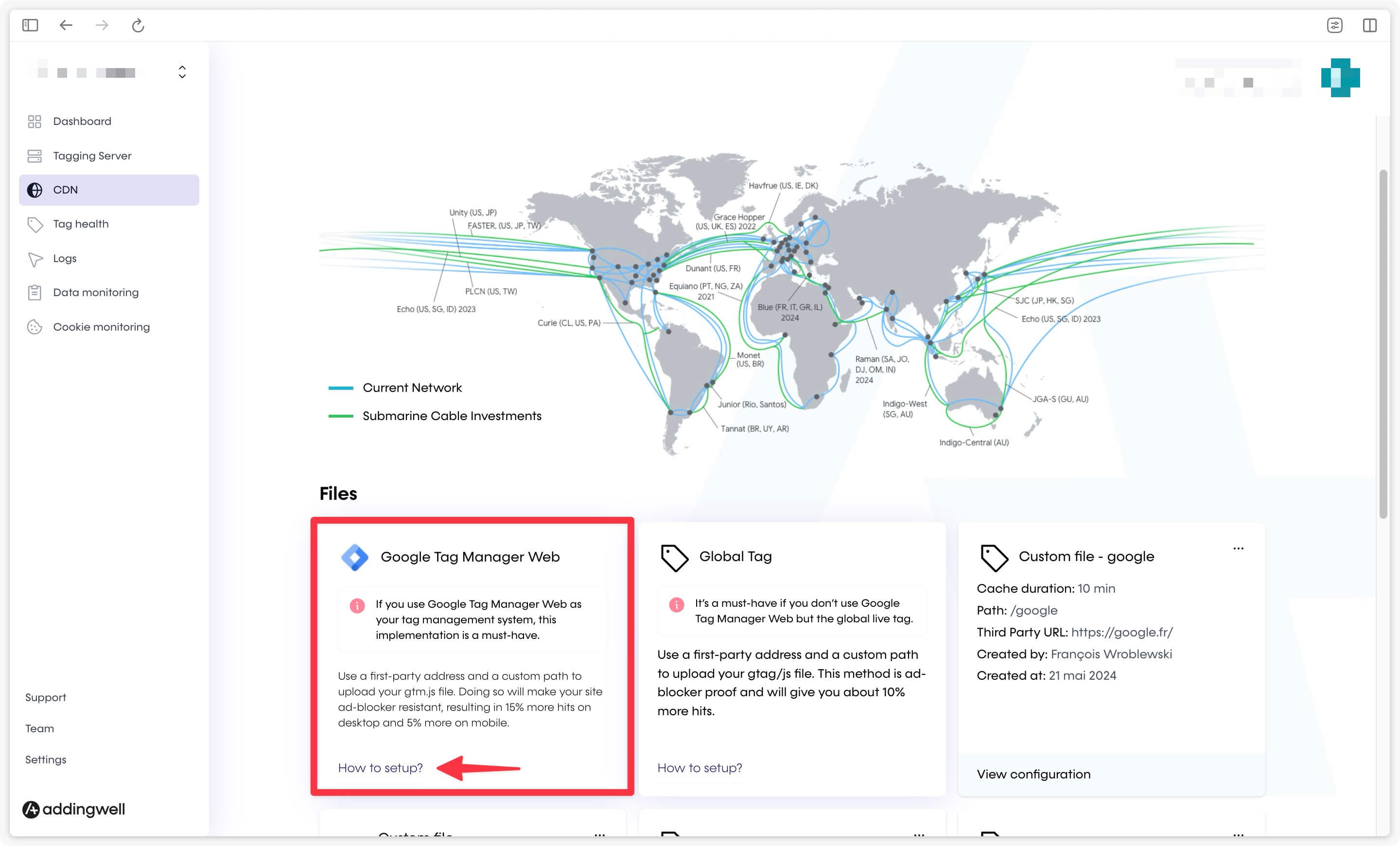
On Addingwell, go to the CDN section and click on the How to setup? link in the Google Tag Manager Web card.
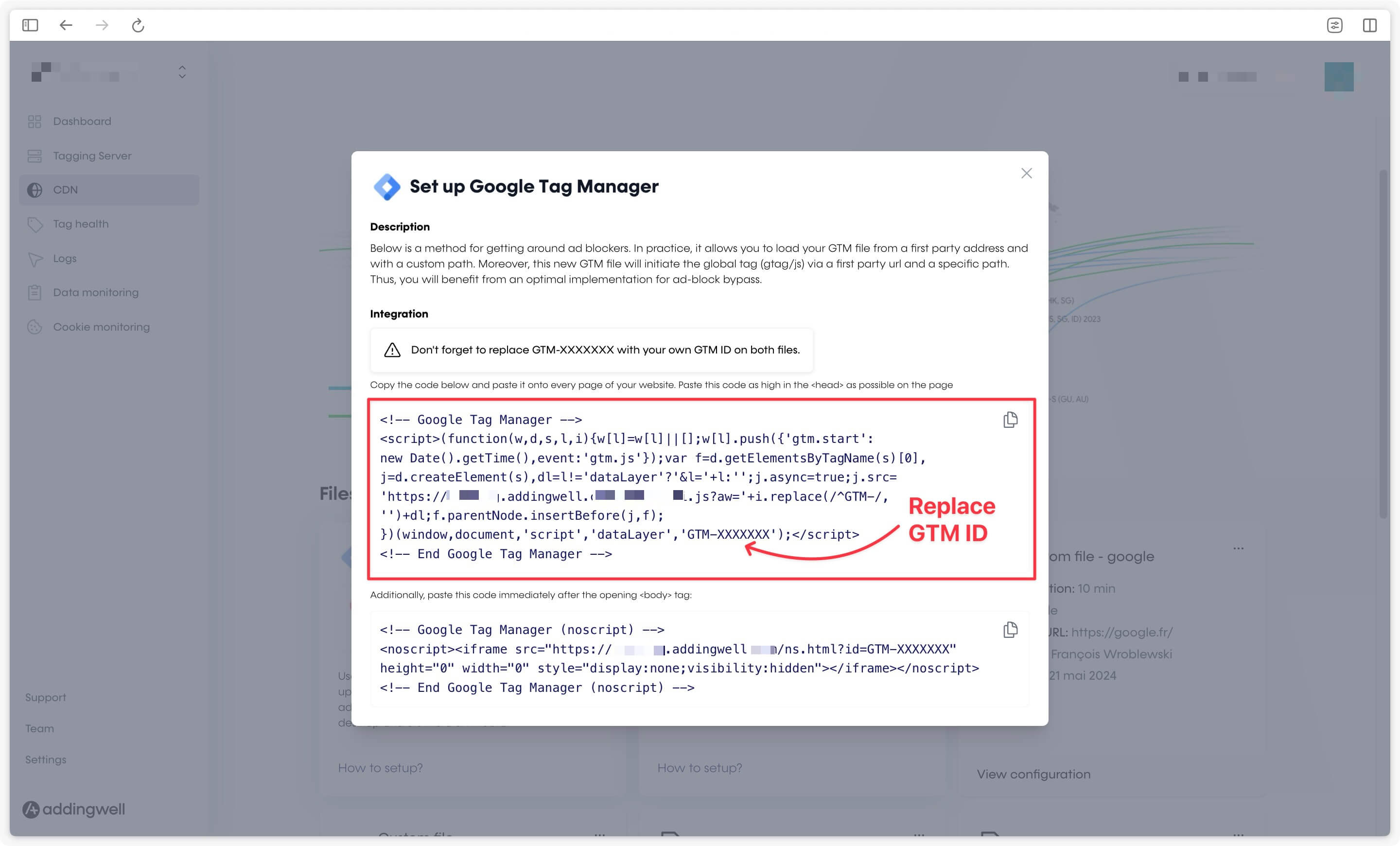
Replace GTM-XXXXXXX with the identifier of your WEB container (not your server container).
Proxify the GA4 library
If you have proxied the Google Tag Manager library, the GA4 library will be proxied automatically if you have a Google tag in your Google Tag Manager container.
Congratulations
Congratulations, you now bypass all the ad-blockers on the market. As part of our constant monitoring process, if you are still experiencing blocked requests after completing all the above steps, please contact [email protected].