TikTok API Conversion Tracking with Google Tag Manager
TikTok Events API: Improve your ad efficiency for optimal performance
New tracking regulations and the decrease in TikTok Pixel efficiency
The tracking sector is evolving rapidly and poses new challenges in data collection, particularly with the emergence of ad blockers, the gradual disappearance of third-party cookies, and the restrictions imposed by certain browsers, such as Safari. As a result, the TikTok Pixel has lost some of its effectiveness, making it difficult to accurately track conversions with this tool alone.
To overcome these obstacles and provide a reliable data collection solution, the TikTok Events API has become an essential tool. Discover why integrating the TikTok Events API is crucial to the success of your ad campaigns, as well as our recommendations for successful implementation.
Combining TikTok Events API and Pixel, and managing deduplication:
The TikTok Events API and TikTok Pixel use different approaches for data collection. Unlike TikTok Pixel, which collects data via the browser and relies on third-party cookies for client-side tracking, the TikTok Events API works with server-side tracking. This allows the Events API to bypass third-party cookies by transmitting user information directly from server to server, ensuring more reliable and accurate data collection.
To date, TikTok recommends using both tracking methods simultaneously by activating both the Pixel and the Events API. TikTok Pixel remains the most effective solution as long as third-party cookies are still available (especially on browsers like Chrome). However, for browsers that have already blocked these cookies, such as Safari or Firefox, the TikTok Events API offers superior performance.
By combining these two tracking systems, you ensure the most optimized solution to guarantee a sufficient volume of data, regardless of the browser used by your visitors.
That being said, setting up dual tracking is not mandatory. While this approach may improve the performance of your ad campaigns, it can also have negative effects on:
- the overall performance of your site: the TikTok Pixel script must be loaded in the browser, which can slow down the site.
- your data governance: by using TikTok’s SDK, you allow the platform to collect certain data autonomously.
The final decision should be based on your priorities and the specific situation of your business.
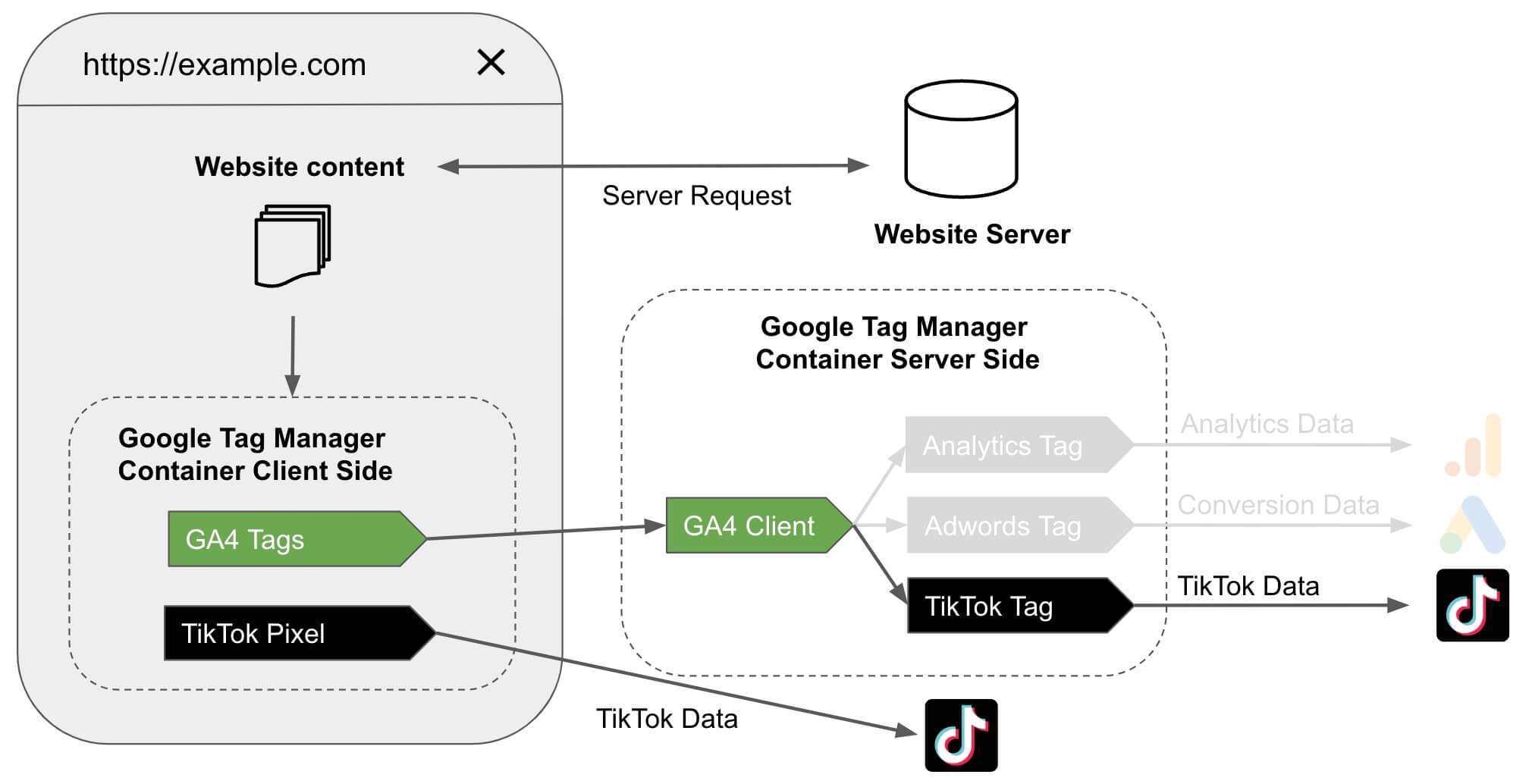
Once the TikTok Events API and TikTok Pixel are configured, it is crucial that TikTok can identify and deduplicate duplicate events. To do this, you must pass a unique and identical event ID across each tracking method. TikTok will then compare these events and remove duplicates, ensuring that only one event is counted.
However, if an event is missed by TikTok Pixel but captured via server-side tracking, TikTok will record this additional event, thereby allowing a complete and exhaustive data collection.
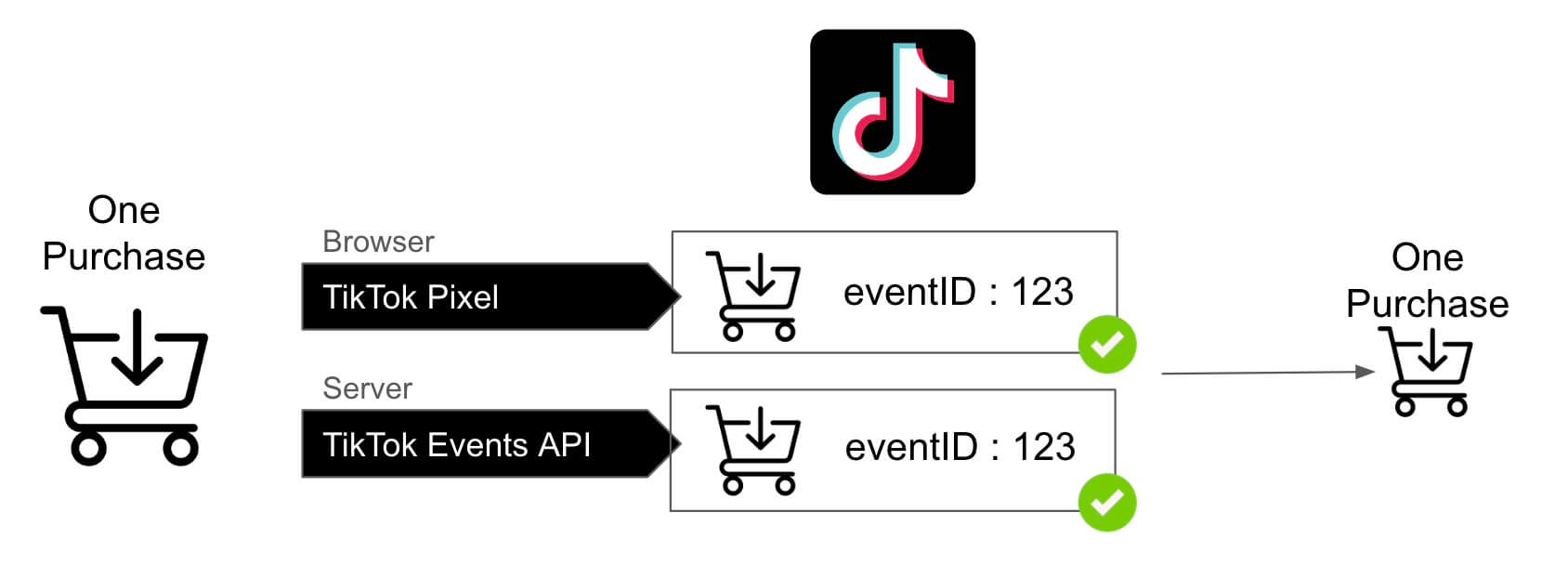
Thanks to this approach, data tracking becomes truly optimal, guaranteeing a high volume of conversions while strengthening the accuracy and reliability of the information collected. This allows you to optimize your ad campaigns by ensuring that every relevant event is properly accounted for.
Addingwell TikTok Events API Tag: deduplication through an event ID
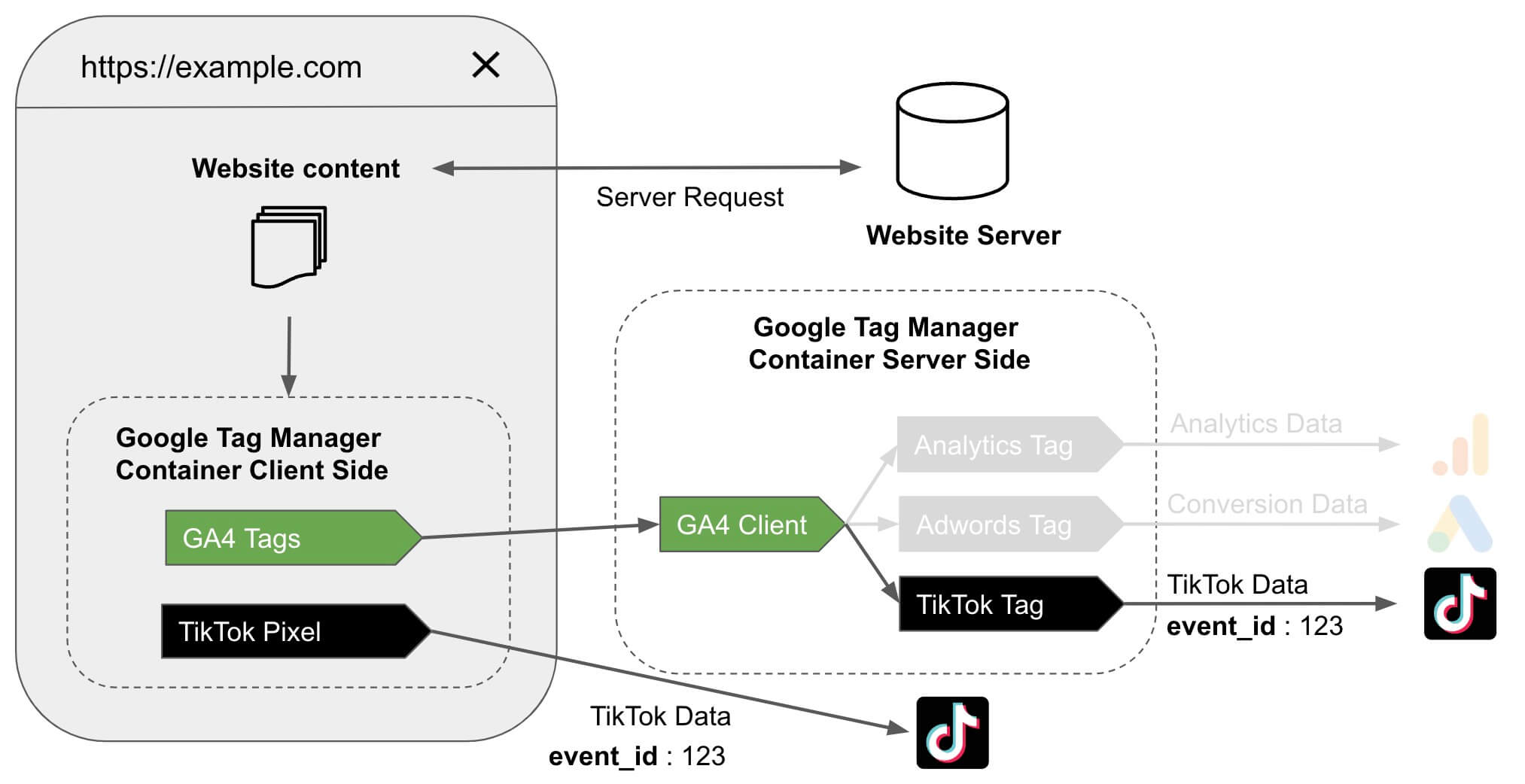
The Addingwell TikTok Events API tag was developed to facilitate combined tracking, using both TikTok Pixel and TikTok Events API, while integrating a unique event ID. This ID is sent simultaneously to TikTok Pixel and in the GA4 event_id parameter, ensuring effective deduplication of events. This guarantees that conversions are accurately counted without generating duplicates.
Please note that we will not go further into the implementation of dual tracking in this documentation. If you need assistance setting it up, feel free to contact our support team.
Expected benefits after set-up
Once the TikTok Events API is in place, along with the bypass of ad blockers and the management of Safari’s ITP, you will notice a significant improvement in the reliability and accuracy of your data. In fact, our clients generally notice an increase in the number of conversions attributed in their TikTok Ads Manager!
Set up the Addingwell TikTok Events API tag
As mentioned in our documentation, the integration of the TikTok Events API is now essential for advertisers. It is the most effective solution to optimize the number of conversions attributed to your ad campaigns.
If implementing the TikTok Events API seems complex, rest assured: the tag developed by Addingwell makes this process much simpler! Follow our detailed guide for optimal TikTok Events API configuration…
Configure the tag
Create a new tag in Google Tag Manager Server-Side and then access the Community Template Gallery.
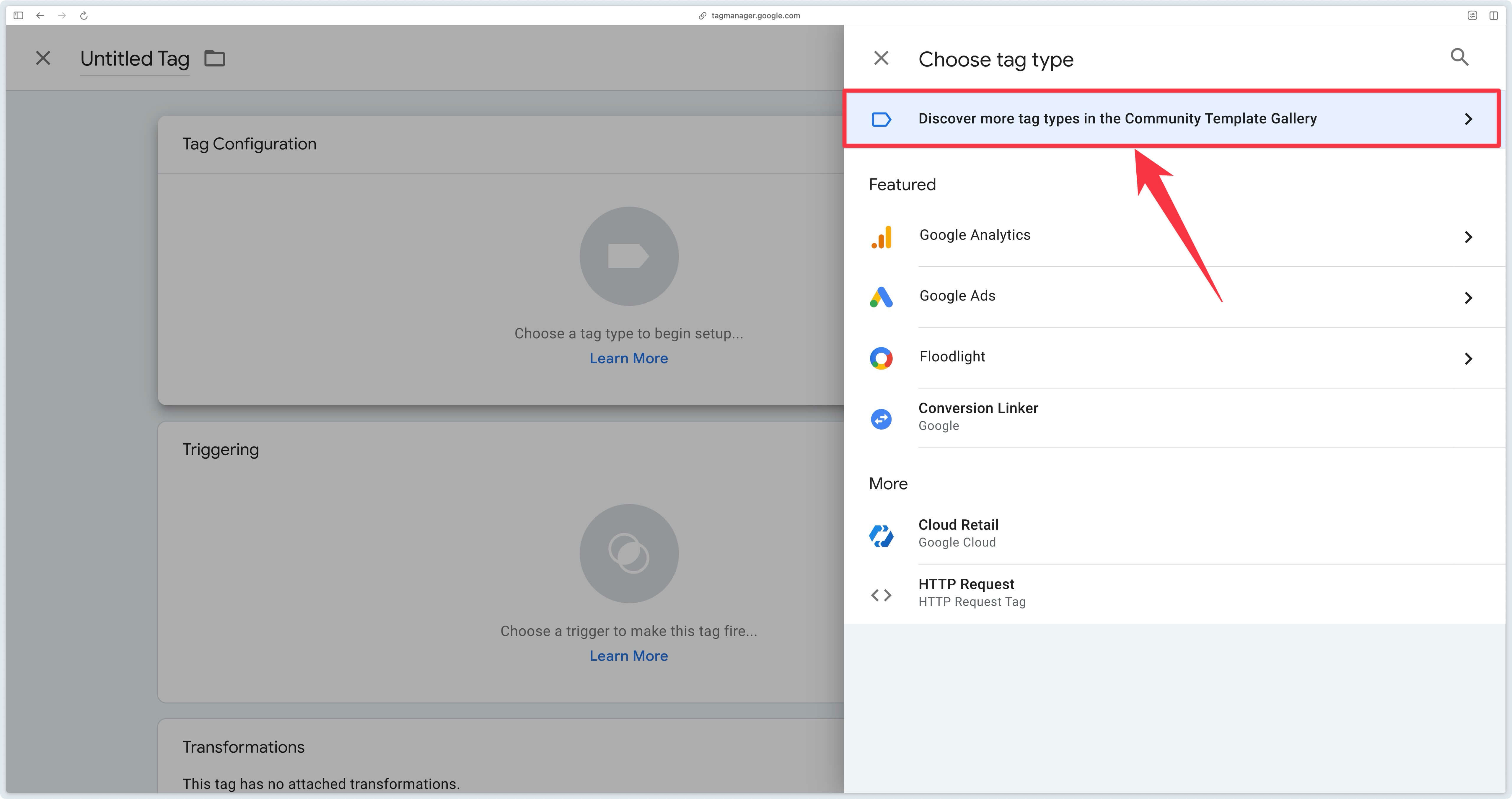
Next, search for the Tiktok Events API by Addingwell tag and import it into your GTM container.
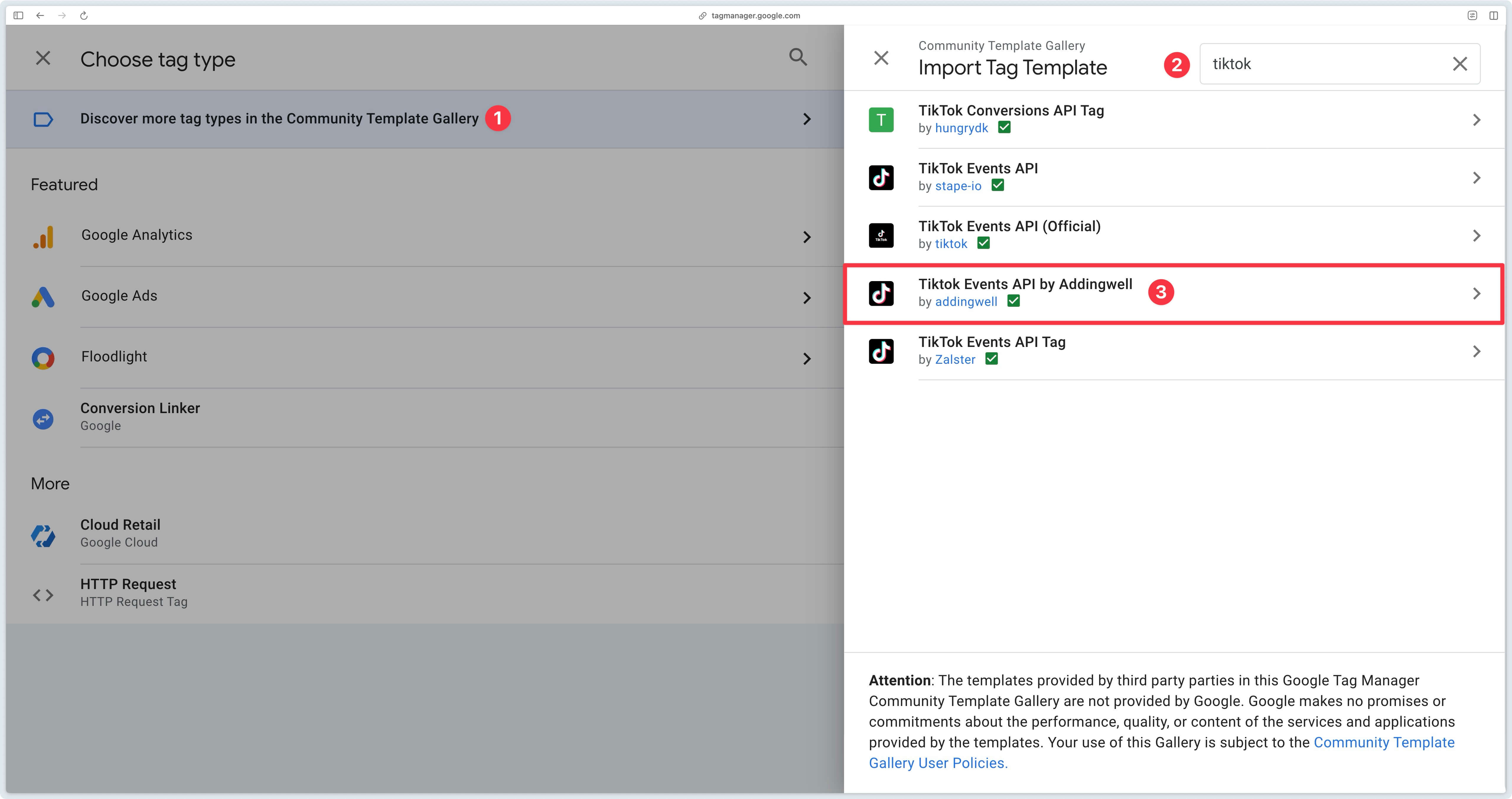
To configure the tag, two pieces of information are required:
- The TikTok Pixel ID to send the data to
- The Access Token allowing communication with the Events API
Once the access token and pixel ID have been retrieved, configure the TikTok Events API tag.
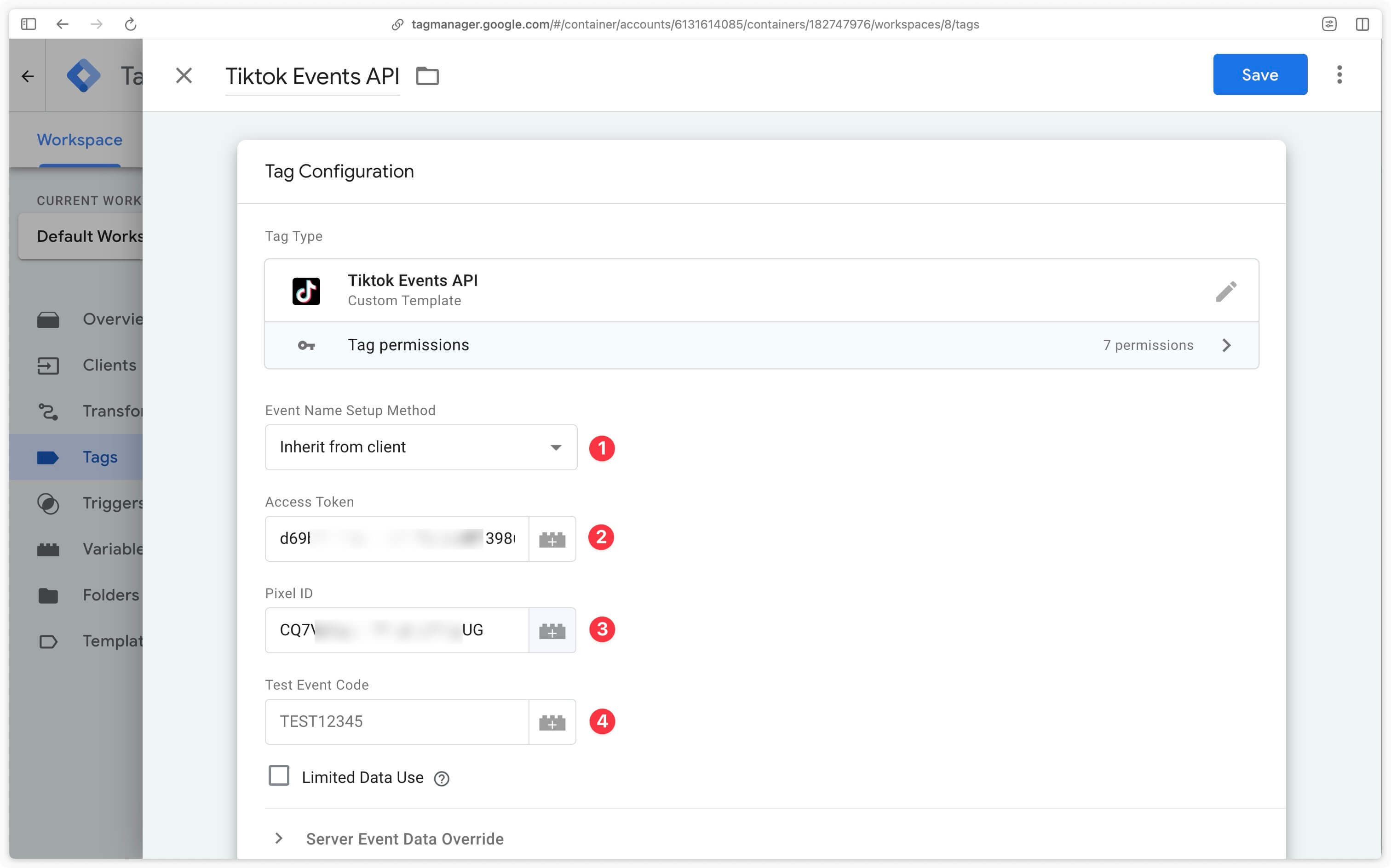
Event Name Setup Method
| Setup Method | Description |
|---|---|
| Inherit from client | Instructs the tag to map GA4 events received from the client-side container to TikTok standard events. |
| Override | Manually associate GA4 events with those to be sent to TikTok. You can choose to send either a standard event or a custom event. |
Access Token
Enter here the access token retrieved in the events manager.
Pixel ID
Enter here the pixel ID retrieved in the events manager.
Test Event Code
Enter here the test code to test sending events to TikTok
It is not recommended to leave a test code in the TikTok Events API tag in production. Make sure to remove it before publishing your server container.
Trigger the tag
Trigger the TikTok Events API tag on the relevant GA4 events using the tag mapping table. For example, for an e-commerce site, the following events are generally used:
| Event name |
|---|
| page_view |
| view_item |
| add_to_cart |
| begin_checkout |
| add_payment_info |
| purchase |
This list of events is of course not exhaustive and depends on your situation.
For optimal organization, create a Lookup Table variable configured as follows:
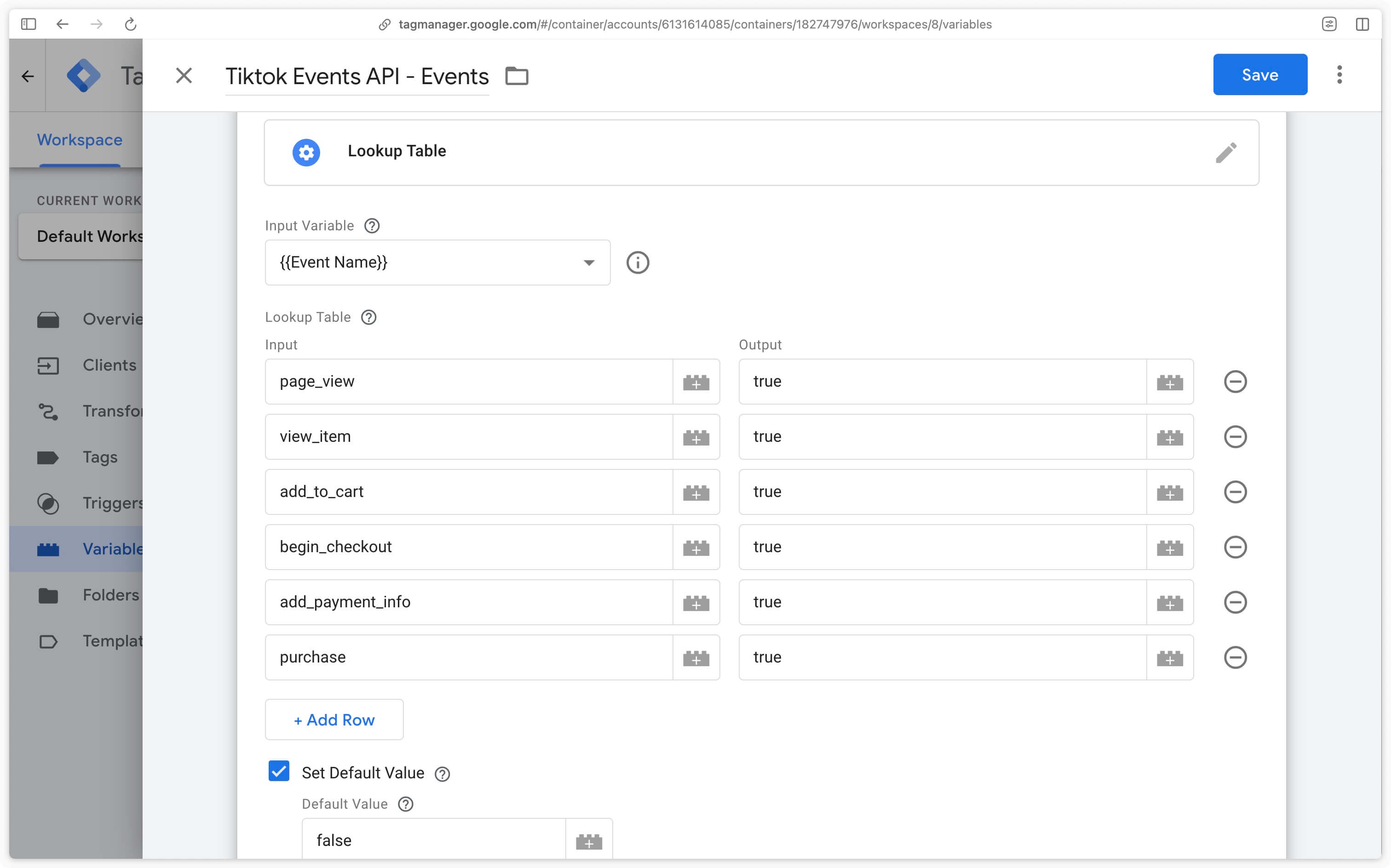
In the TikTok Events API tag, create a custom trigger verifying that the events come from GA4 (Client Name = GA4) and that the previously configured Lookup Table returns true.
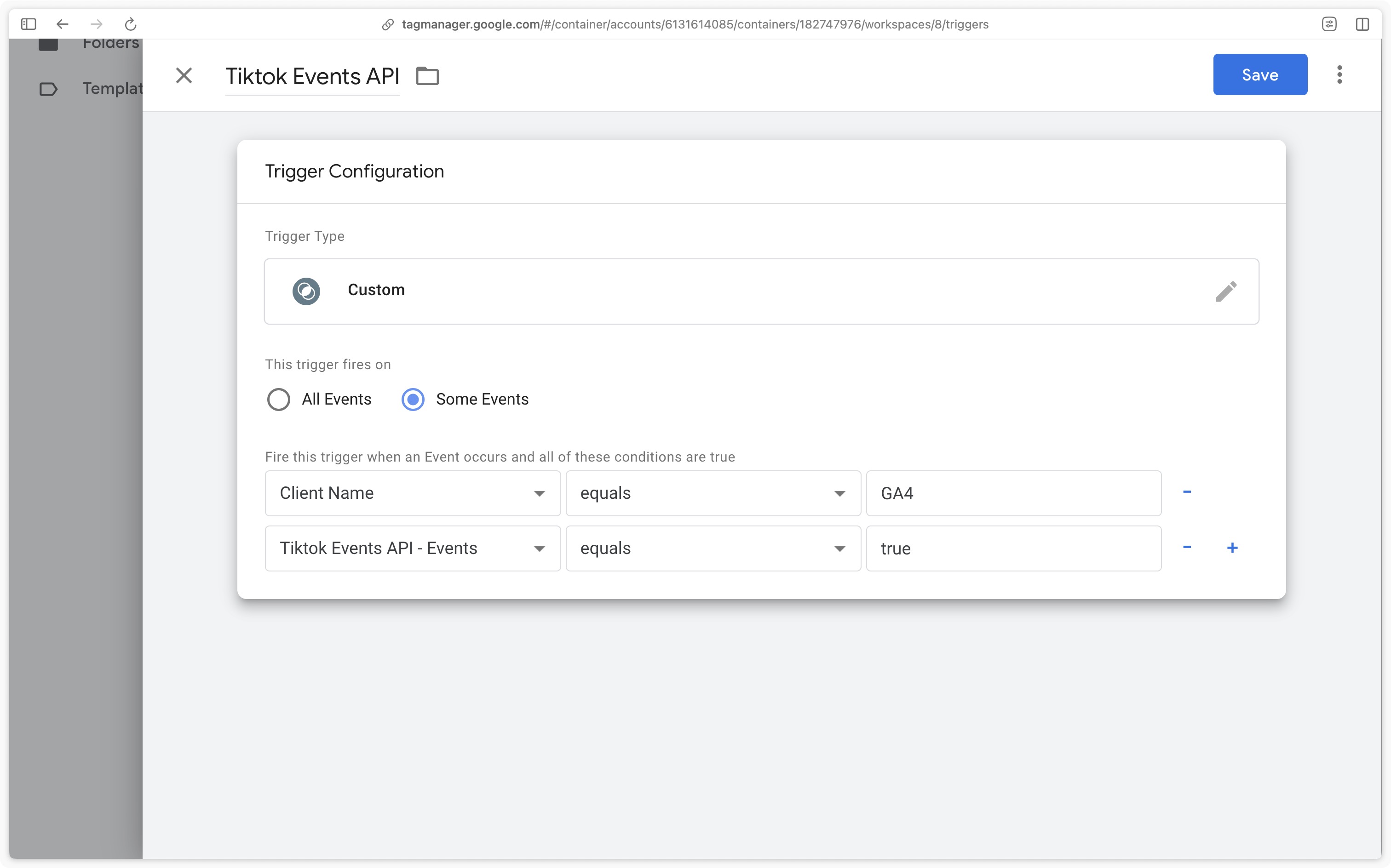
Depending on the country in which your website operates and the regulations in force regarding data collection (GDPR in Europe, CCPA in California, Law 25 in Quebec, etc.), it is imperative to configure the tag trigger based on user consent. Ensure that the tag is triggered only when the appropriate consent has been obtained, in accordance with applicable legal requirements.
Verify the data received
After configuring your TikTok Events API tag, it is essential to verify the following points:
- that your server container correctly transmits events to TikTok,
- that the volume of events received by TikTok is consistent and meets your expectations,
- that the quality of the data is high enough to allow TikTok to match your key events to a specific user on the platform.
Verify event sending
GTM Server-Side Preview
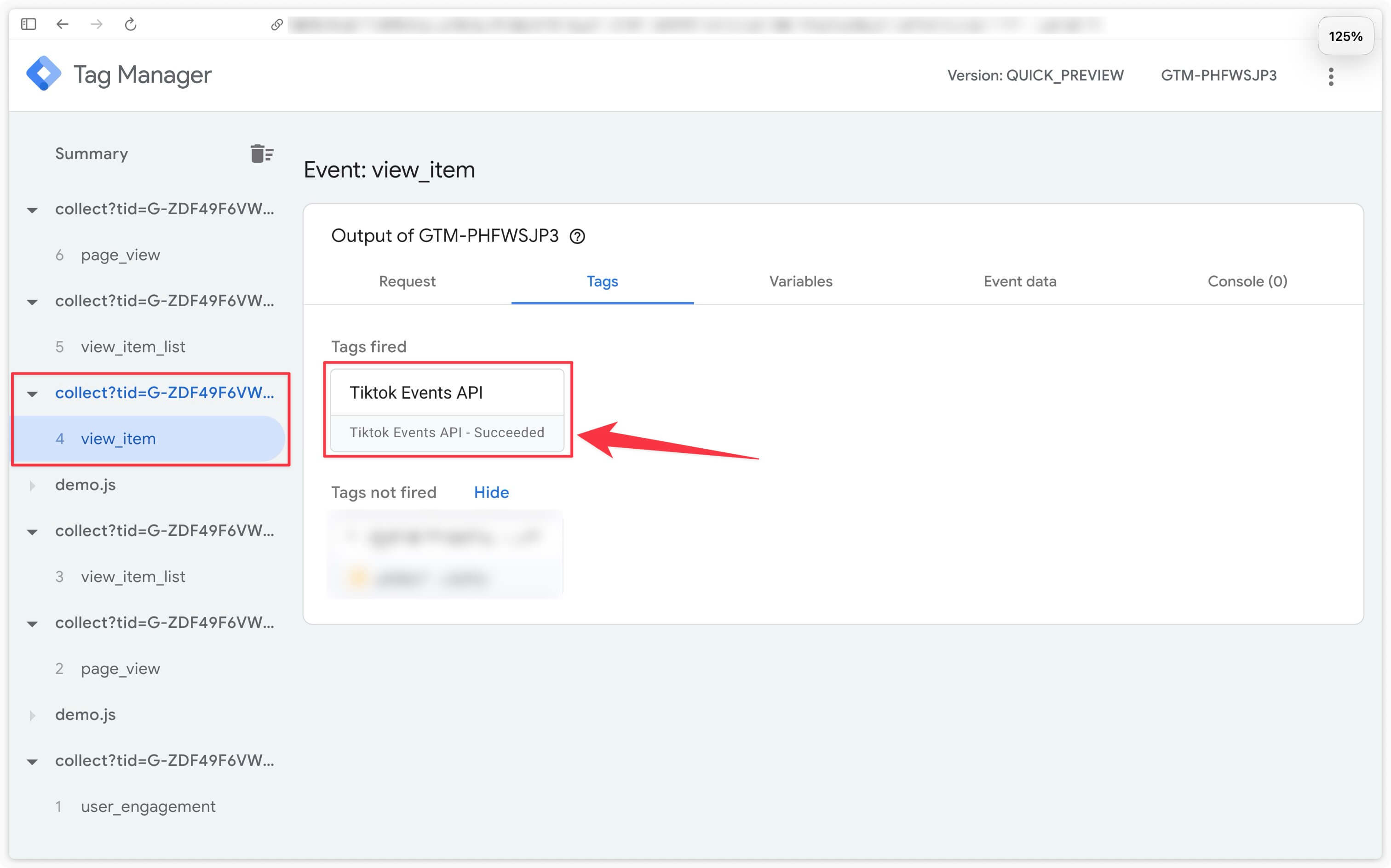
The first step is to verify that the TikTok Events API tag is triggered correctly for the events defined in the trigger. In server container preview mode, make sure that the TikTok Events API tag is triggered for a specific event (in this example, we check its activation for the view_item event). Confirm that it appears in the Tags Fired section and that its status is indicated as Succeeded.
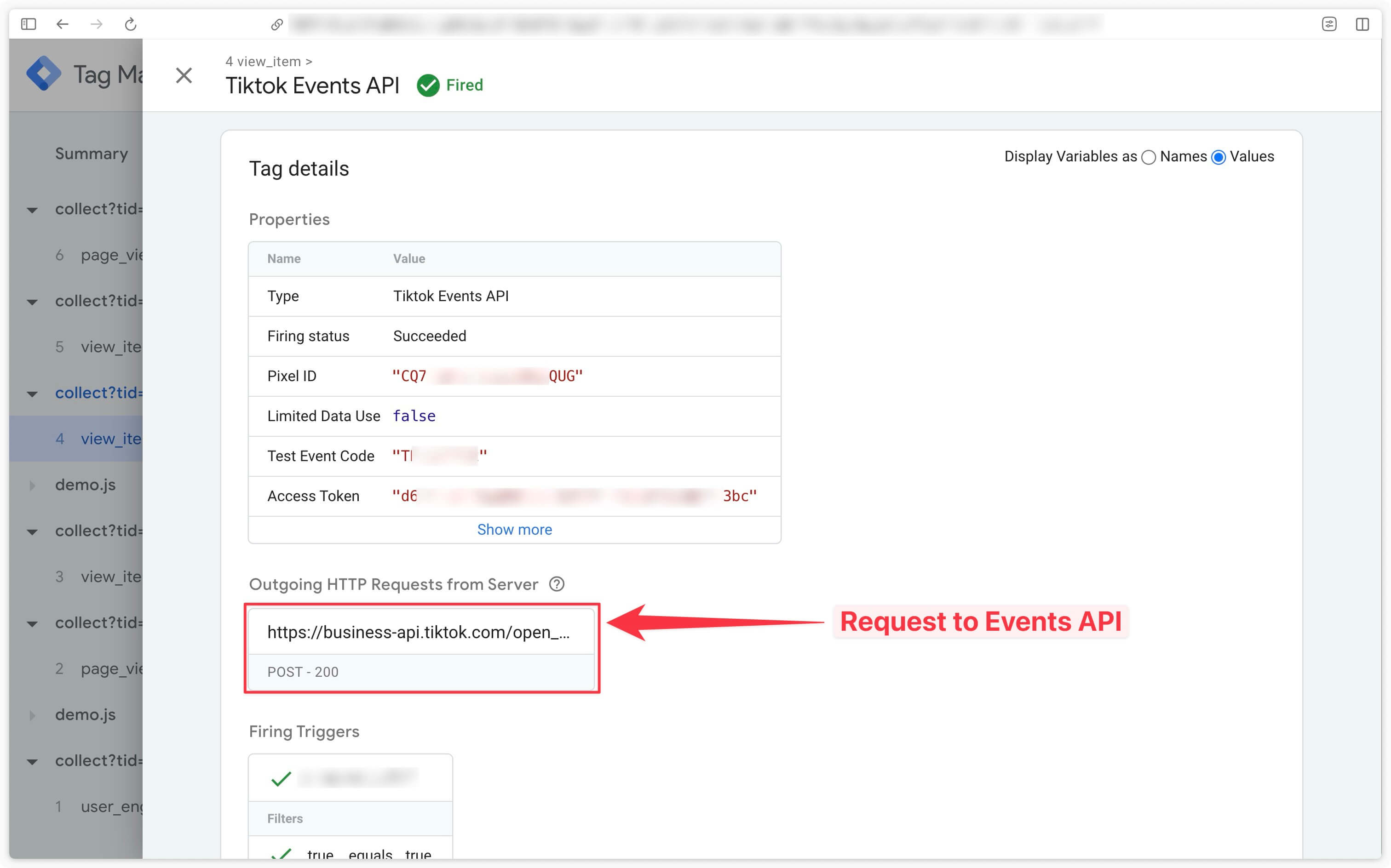
In the preview, click on the TikTok Events API tag to check that requests have indeed been sent to TikTok via the Events API.
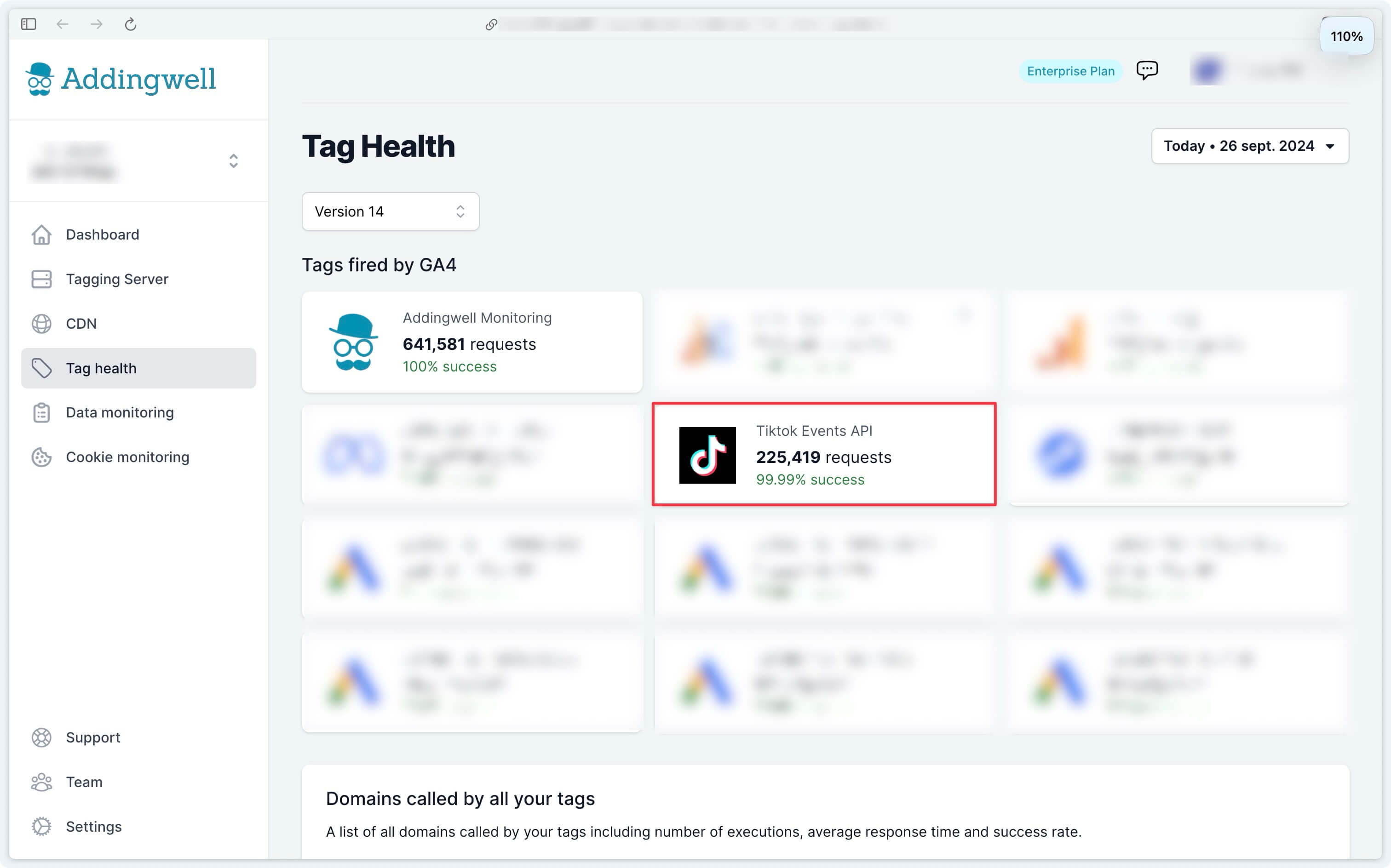
On Addingwell side via Tag Health: successful requests
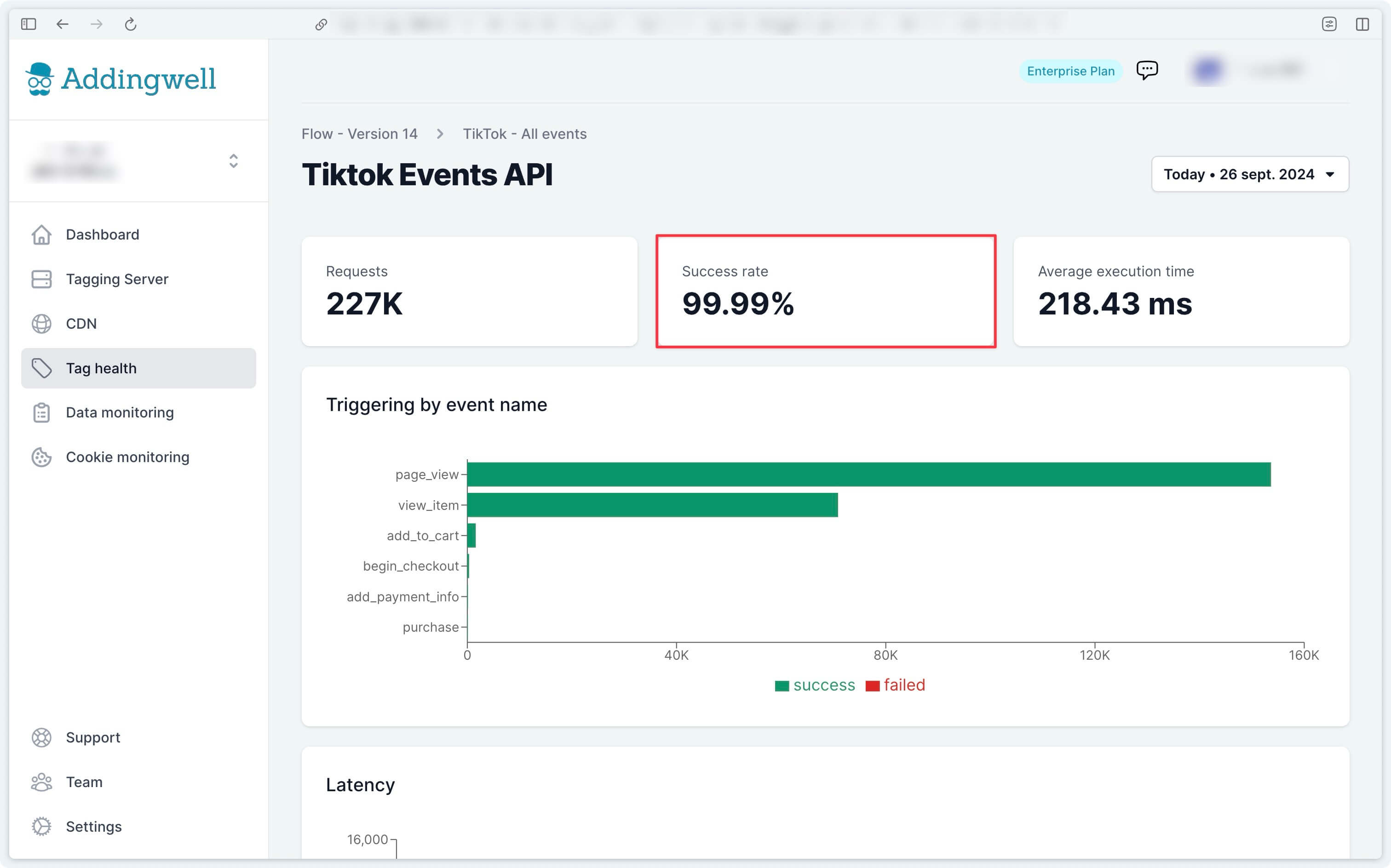
Access the Tag Health tab from your Addingwell workspace. Start by analyzing the number of requests sent for the TikTok Events API over a given period, as well as the success rate of these requests. Click on TikTok Events API to get more details.
This screen displays the details of events transmitted from your server to the TikTok Events API, as well as the success rate of requests, which in our example is 99.99%.
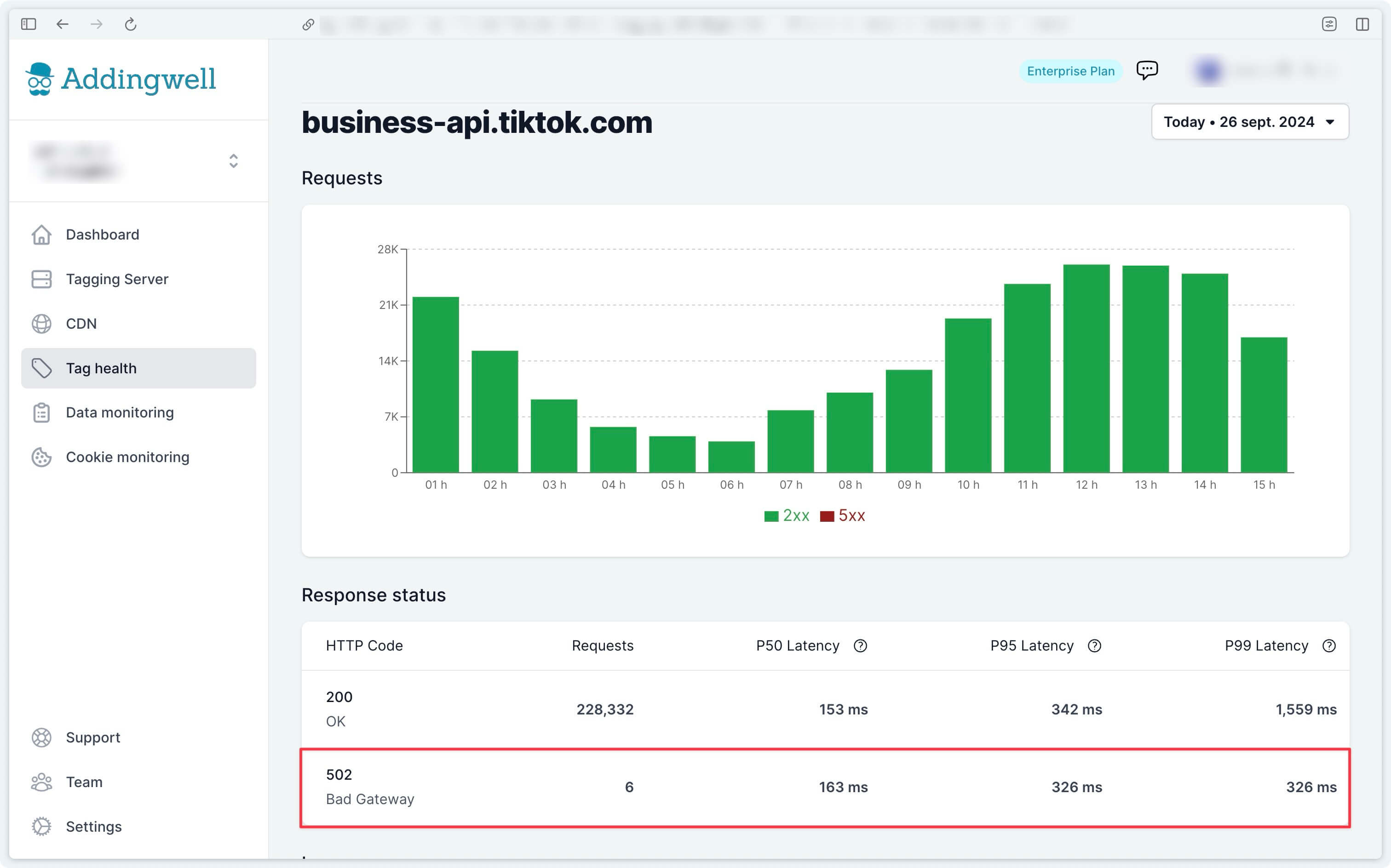
To examine error requests, we will go deeper by retrieving the logs of these errors. Go to the Logs tab to access the logs of each tag in place on your server. Click on the TikTok API Logs.
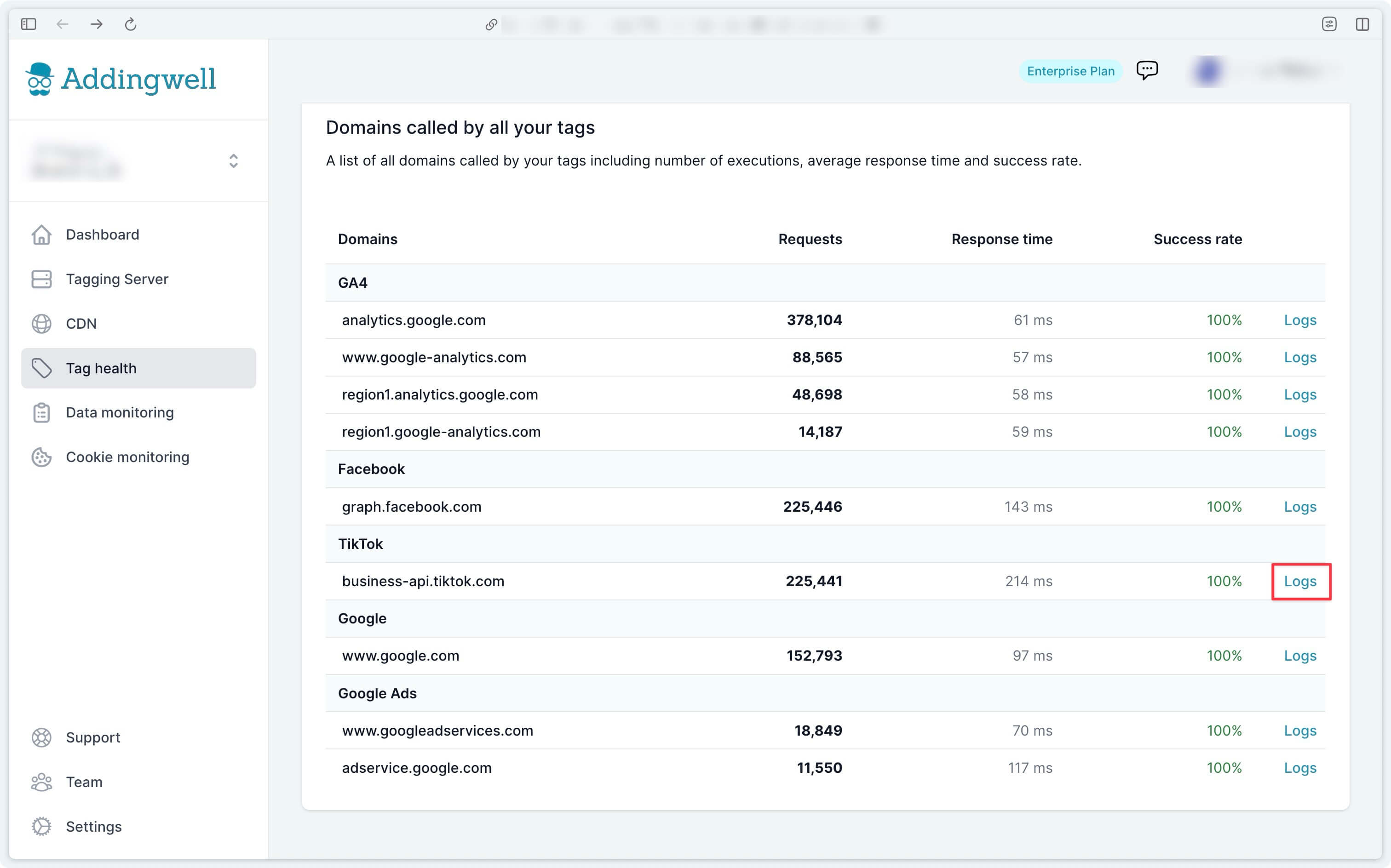
For example, in the error logs of our account, the most frequent error (6 occurrences) was due to the TikTok API being unavailable. In this example, apart from waiting for the API to become available again, there is not much more you can do.
Verify the quality of data received
Sending your conversion events to TikTok’s platform is an essential step, but this process can be optimized by integrating user data (such as an email address, phone number) into these events. This information allows TikTok to match the data transmitted from your server to a real user in their database, improving conversion tracking accuracy.
This allows TikTok to:
- More precisely attribute conversions, identifying conversions that would not otherwise have been associated with your TikTok campaigns.
- Optimize your bids more effectively, by relying on better quality data.
For a detailed guide on reliably sending user data server-side, consult our documentation on this topic.
On Addingwell side via Data Monitoring
Access the Data Monitoring menu from your Addingwell workspace. This screen allows you to view all user data processed by your GA4 client and available for your server-side events. For example, you can see that email data is present in 25.9% of events received server-side.
To view the list of events where user emails were transmitted, click on the search icon for more details.
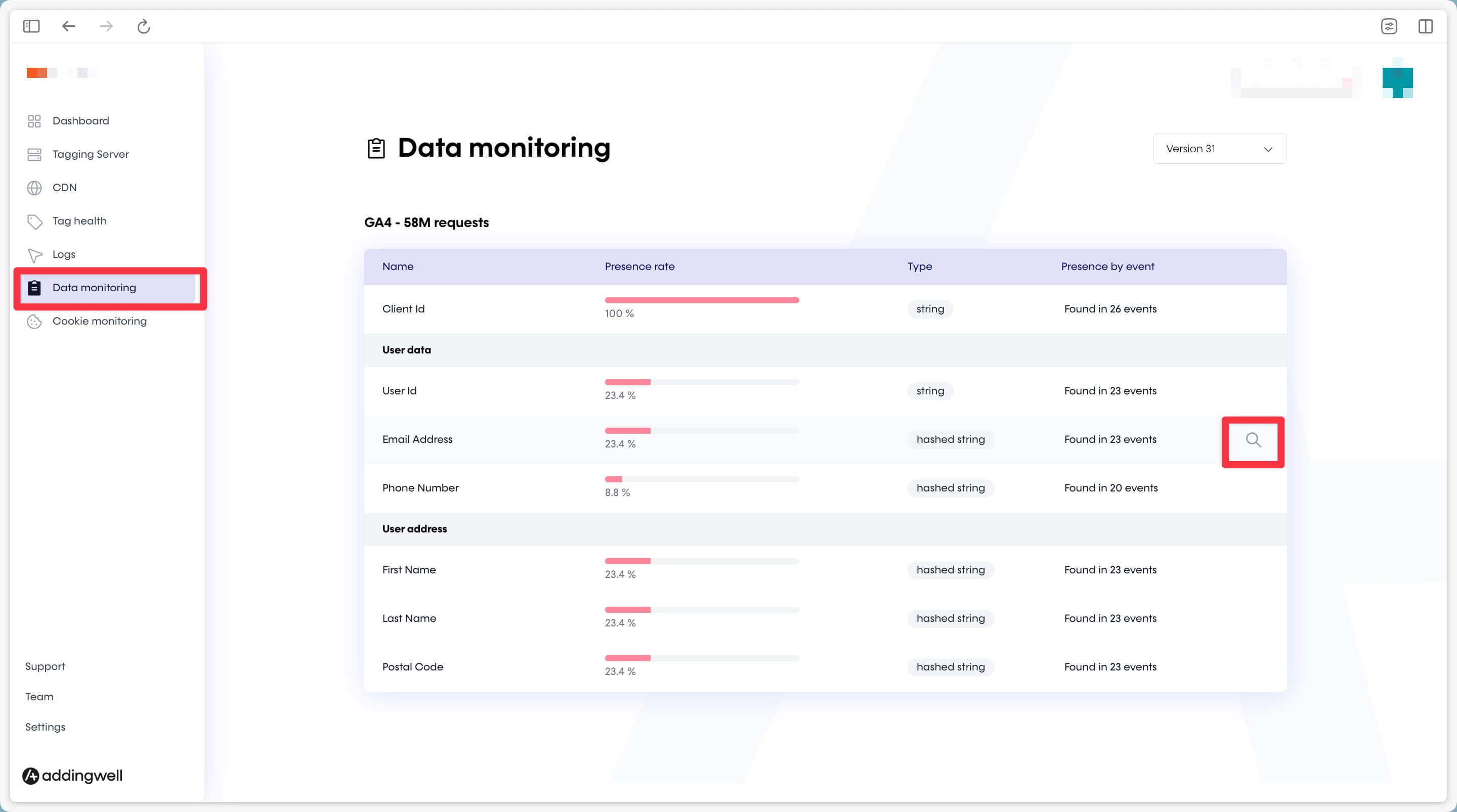
On this screen, you can see the percentage of user email data presence in your server-side events.
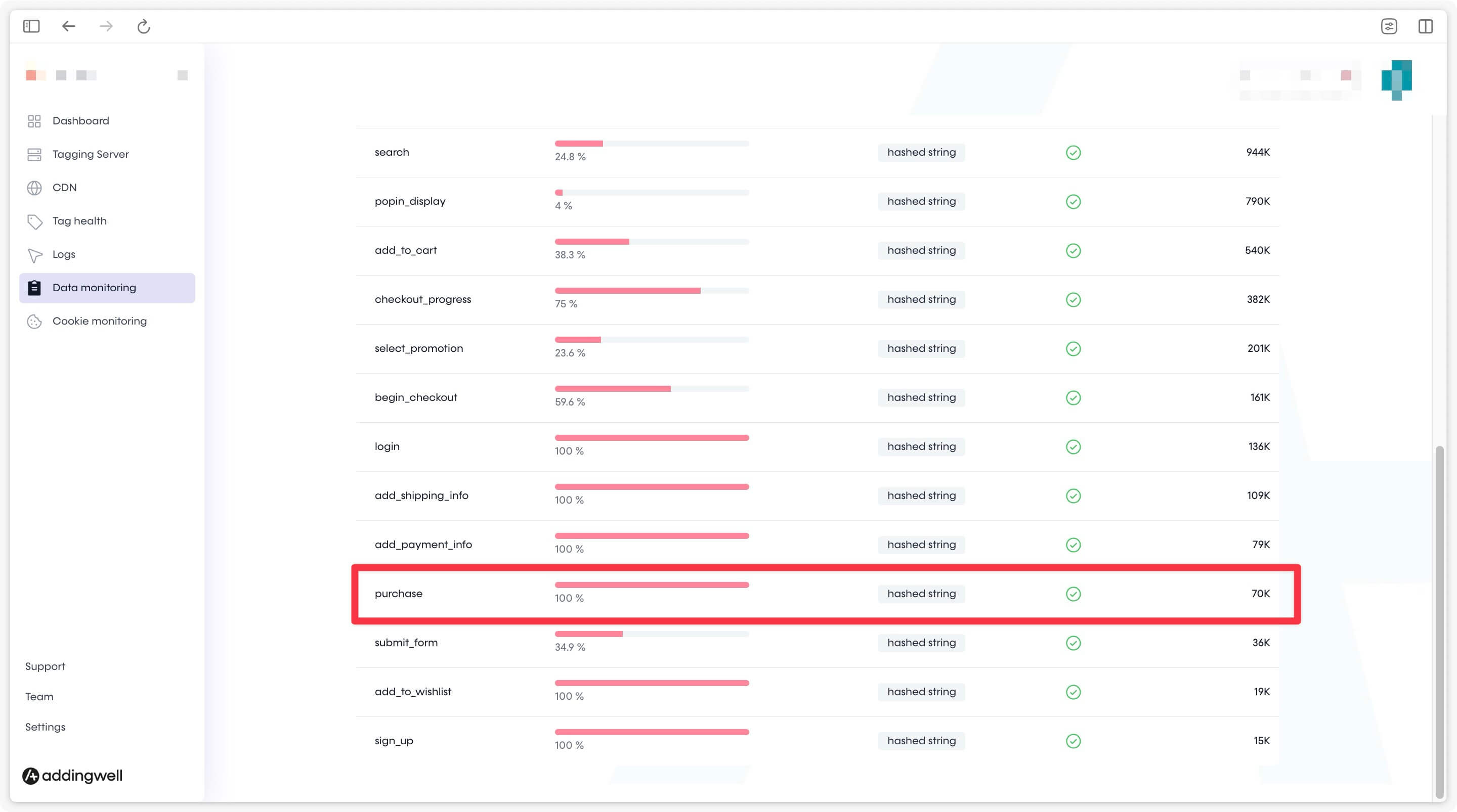
In our example, user email data is present in 100% of purchase events, but only in 35.8% of add_to_cart events. This remains consistent with our conversion funnel, as the email is not always required or available at the add-to-cart step.
The quality of the data transmitted is good, as the events contain the relevant and available user information, ensuring effective tracking.
Congratulations
You have completed the configuration of the TikTok Events API, and you have verified that your data is correctly transmitted to TikTok and that its quality meets expectations. You are now ready to optimize your ad campaigns with reliable and accurate data.
If you encountered any issues during these steps, do not hesitate to contact our support team.