Google Tag Gateway (GTG) and/or Addingwell?
Context: why data collection is declining
Today, data collection is mainly impacted by two blockers: ad blockers and certain browser restrictions (including Safari).
The growing use of ad blockers
More and more users run ad blockers, which can prevent Google scripts from loading (Google Tag Manager Web or Google tag), and can sometimes block measurement requests directly.
If these files don’t load, tags don’t run → an immediate drop in data collection.
Example
A user visits your site with an ad blocker. If gtm.js doesn’t load, your GTM container doesn’t start, so your events (page_view, add_to_cart, purchase…) won’t be sent.
Safari restrictions
Safari applies privacy protections (ITP) that can, in some cases, reduce the lifetime of certain marketing cookies to 7 days.
This can happen when Safari considers that the cookie is set in a “context” different from the site’s context (depending on the tracking architecture used, and especially how tracking is served/routed).
Result: attribution, measurement, and analysis are degraded for Safari visitors.
Example
A Safari user visits your site, then comes back 10 days later. If cookies expired after 7 days, they may be “seen” as a new user, which hurts attribution (campaigns), audiences, and journey analysis.
The Google Tag Gateway (GTG) solution
Overview of Google’s solution
In a standard setup, your page loads tags from Google domains. When a tag fires, requests are sent directly to Google.
With Google Tag Gateway (GTG), the logic is the same… except that:
- the browser loads GTM / Google tag from your own domain (instead of a Google domain),
- and some measurement requests also go through your domain, before being forwarded to Google.
In practice, GTG means setting up a first-party “gateway” (reverse proxy) between your site and Google.
Example (before / after)
- Before: the browser loads https://www.googletagmanager.com/gtm.js?id=GTM-XXXX
- After GTG: the browser loads an equivalent file from your domain, for example - https://example.com/8kpl/gtm.js?id=GTM-XXXX
The same applies to some measurement requests: they go through example.com/8kpl/… instead of going directly to a Google domain.
GTG in practice: reverse proxy + measurement path
GTG relies on two elements.
The measurement path (dedicated path)
GTG uses a dedicated path on your domain, for example: https://example.com/8kpl/
This path is used to:
- load Google scripts in first-party,
- carry measurement requests.
Why a dedicated path?
Because it clearly separates what belongs to the “GTG gateway” from the rest of your site.
The reverse proxy (the “gateway”)
This is a component (often a CDN like Cloudflare) that receives a request on your domain, then forwards it to the right destination.
You can think of it as a “single front desk”:
- the browser talks to example.com,
- the infrastructure fetches the resource from the right place (Google, then back to the browser).
Example
You configure a rule like: “Everything that starts with /8kpl/ must be forwarded to GTG / Google endpoints.”
From the user’s point of view, everything happens on example.com, even though “behind the scenes” Google is responding.
Benefits and limitations
Partial reduction of ad blocker impact
With GTG, scripts and some requests go through your own domain. This mainly reduces blocks that rely solely on the fact that resources come from a Google domain.
However, this is not a 100% bypass guarantee: some ad blockers also block based on what the request looks like (e.g., URL format, parameters, path used, request type), even if the request comes from your domain.
Safari 16.4+: GTG does not solve the ITP problem
Safari applies restrictions (ITP) that limit the lifetime of cookies set via JavaScript (document.cookie) to 7 days, even if the script is loaded from your own domain.
Google scripts (GA4, GTM) set their cookies via JavaScript in the browser. The fact that these scripts are served in first-party through the GTG reverse proxy does not change how cookies are written: they are still set via JavaScript, and Safari continues to cap them at 7 days.
GTG therefore does not solve the Safari/ITP limitation. To maintain cookies beyond 7 days on Safari, cookies must be set server-side (via an HTTP Set-Cookie header), which GTG does not do.
Scope
GTG applies to Google scripts and tags (Google tag, GTM, Google tags). It does not transform your non-Google tags (Meta, TikTok, etc.).
Setting up GTG
GTG is a Google product, independent from Addingwell. Its setup is done directly through Google’s tools and documentation.
Addingwell does not provide support for GTG configuration. For any questions related to GTG installation or setup, please refer to the official Google documentation below.
- Google Tag Gateway overview : product overview and how it works.
- GTG setup guide : step-by-step implementation guide (automatic and manual setup).
- Configure GTG with your CDN : reverse proxy configuration via your CDN.
The Addingwell solution
Overview of the Addingwell approach
Addingwell is built on an architecture where event collection and delivery happen natively in first-party, with a full server-side layer.
Concretely, Addingwell provides:
- server-side tagging (your events are sent to your tracking server),
- advanced optimizations for ad blockers (Addingwell CDN option). To know more about it, see our documentation on Bypassing ad blockers,
- and a Safari resilience approach, mainly via a Reverse Proxy (and, if a reverse proxy is not possible, a fallback option like Cookie Restore). To know more about it, see our documentation on Bypassing Safari’s ITP.
Example (server-side)
Your site sends an event (e.g., purchase) to your tracking endpoint (first-party). The Addingwell server receives this event and then forwards it to GA4, Google Ads, Meta, etc.
Result: you centralize collection and gain more control over how data is distributed.
Addingwell in practice: ad blockers and Safari
Bypassing ad blockers (Addingwell CDN option)
Addingwell enables advanced bypassing thanks to:
- advanced proxying of the GTM library,
- advanced proxying of the GA4 library,
- and automatic transformation of GA4 requests (e.g., the /g/collect endpoint no longer appears).
Instead of a request that clearly looks like GA4 collection (with /g/collect), the request is modified so it no longer exposes that standard path. Many blockers rely on these easy-to-spot “signatures”.
Unlike GTG, this approach isn’t limited to “switching to first-party”: it makes requests much harder for blockers to identify.
Safari resilience: server-side cookies
Unlike GTG (where cookies are set via JavaScript by Google scripts), Addingwell sets cookies server-side (via an HTTP Set-Cookie header). This fundamental difference is what allows cookies to be maintained beyond 7 days on Safari.
Two options are available:
- Reverse Proxy DNS (e.g., Cloudflare): your tracking server traffic goes through the same DNS as your site. Cookies, set server-side, are considered first-party by Safari and retain a 13-month lifetime.
- Cookie Restore: an alternative solution when you can’t set up a reverse proxy. A server-side “Master Cookie” automatically restores marketing cookies beyond 7 days.
Benefits and points of attention
Addingwell offers broader coverage than GTG:
- effective Safari resilience (server-side cookies, unlike GTG),
- more advanced ad blocker bypass,
- a complete server-side stack,
- multi-destination support and governance/enrichment capabilities.
GTG + Addingwell setup
It’s entirely possible to combine GTG and Addingwell. The two solutions are not incompatible because they don’t play exactly the same role:
- GTG mainly provides a “reverse proxy + first-party delivery” layer (Google scripts + some requests via your domain)
- Addingwell provides a full server-side layer (collection, processing, redistribution to multiple destinations)
In other words: GTG can be the first-party “front door”, and Addingwell can be the server-side “engine” behind it.
When does it make sense?
The GTG + Addingwell combo is relevant if:
- you want to enable GTG (Google recommendation, internal IT policy, standardization) while needing a full server-side stack (multi-destinations, governance, ad blocker optimization, Safari resilience),
- and/or you want a reverse proxy based on a measurement path that meets Google’s expectations.
Two common ways to combine them
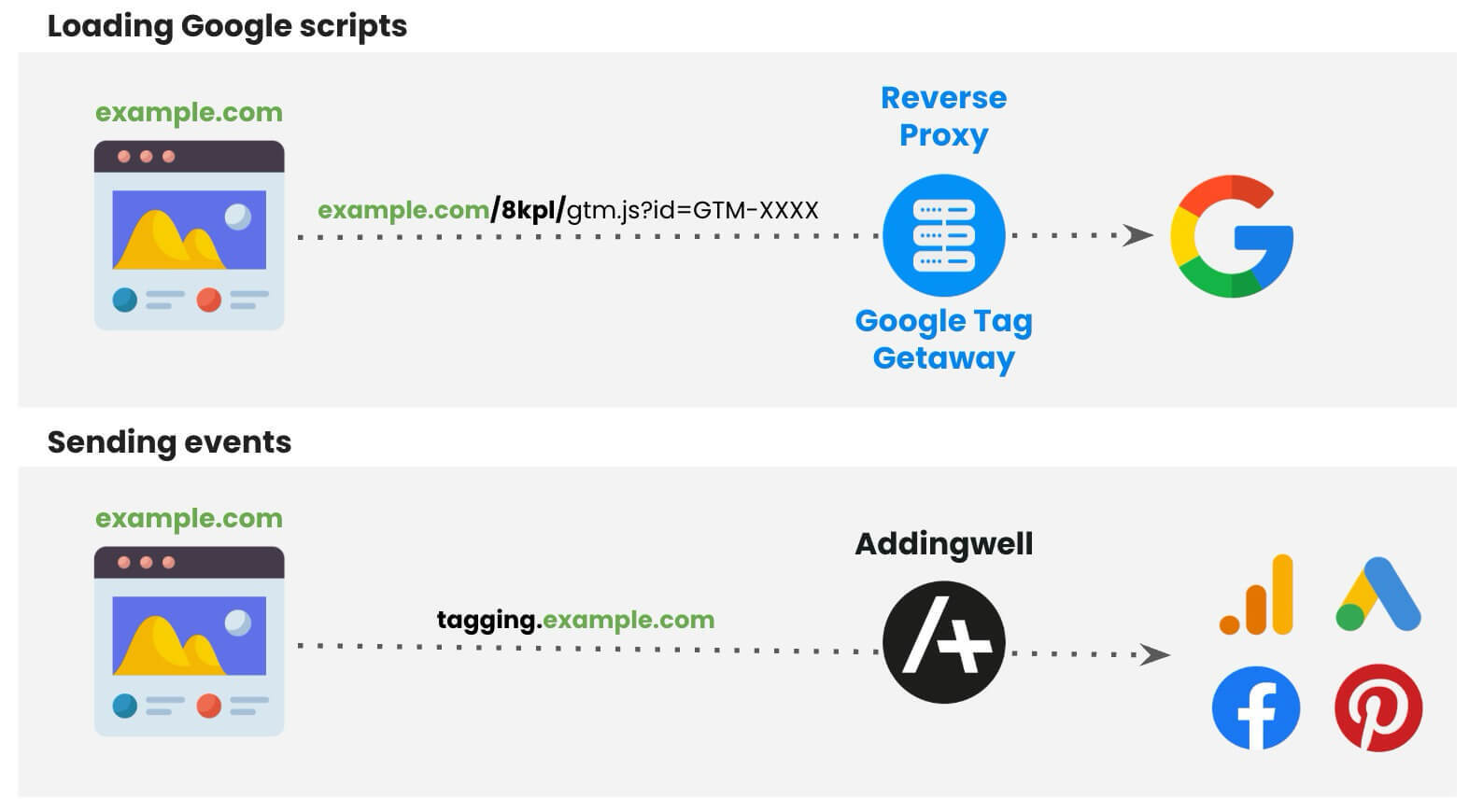
Option A - GTG loads the tag, Addingwell keeps its collection endpoint (the simplest)
Here, you use GTG mainly to serve Google scripts in first-party (via the measurement path).
Then, when an event is triggered, it is sent to Addingwell’s collection URL (as in a classic Addingwell setup).
Example
- Scripts load via GTG: https://example.com/8kpl/gtm.js?id=GTM-XXXX
- But events are sent to the Addingwell endpoint: https://tagging.example.com/… (or another first-party endpoint already in place)
When should you choose Option A?
When you want a simple setup with the fewest changes: GTG handles first-party “loading”, and Addingwell remains your usual server-side entry point.
Option B - Measurement path as the single entry point (the most “GTG-aligned”)
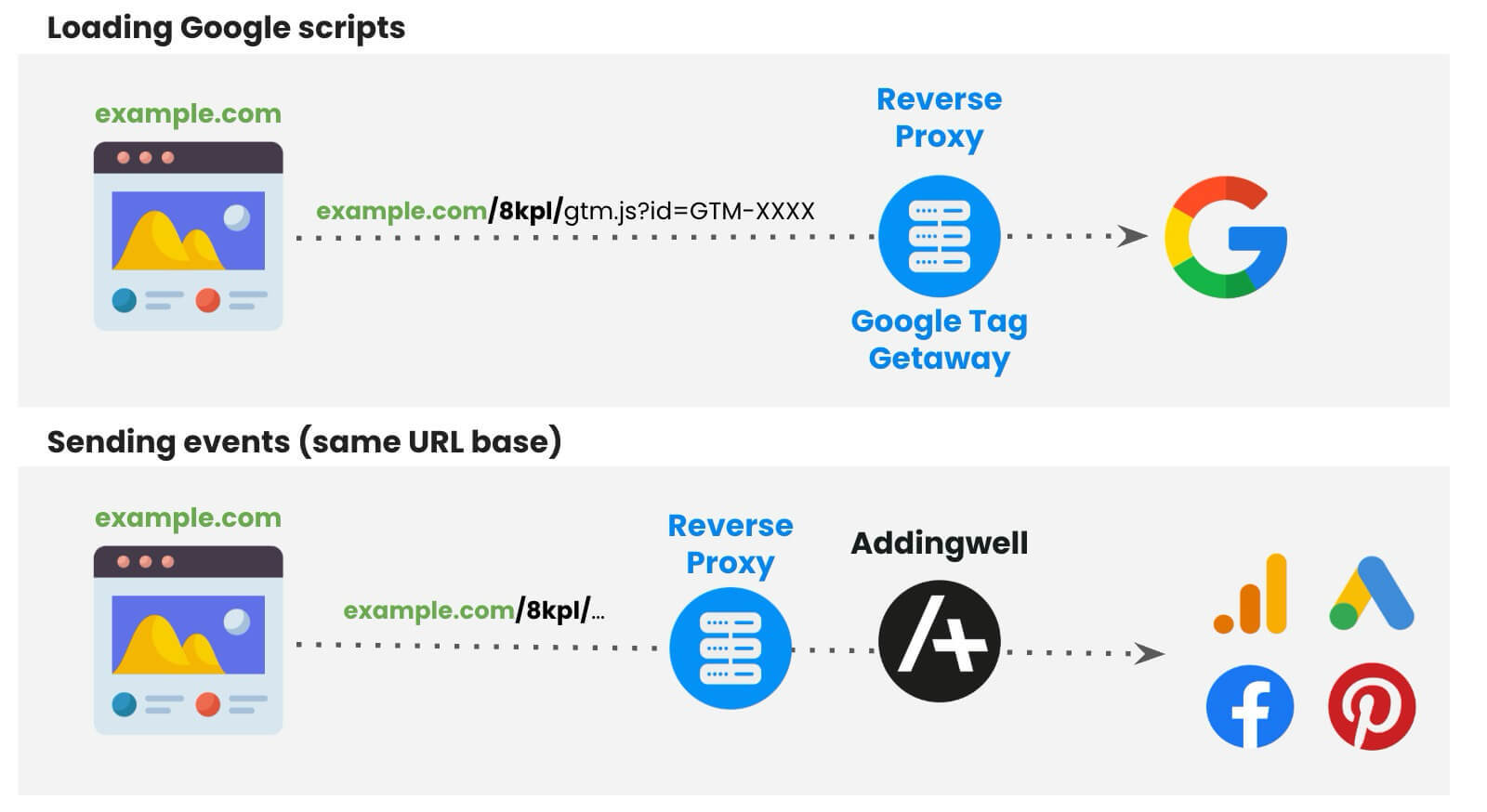
Here, you go further: you use the measurement path as a single entry point for tracking.
The browser talks to only one base URL, for example https://example.com/8kpl/… .
Then the reverse proxy routes:
- some requests to Google (for GTG to work),
- and others to Addingwell (for server-side collection).
Example
- The tag loads via: https://example.com/8kpl/gtm.js?id=GTM-XXXX
- And events are also sent via: https://example.com/8kpl/collect → then the reverse proxy forwards them to Addingwell.
Why is this interesting?
you have a single “site” entry point (same domain + same path) for tracking, which is highly consistent with the GTG “measurement path” approach,
Point of attention
Option B requires more careful routing, because the reverse proxy must distinguish what should go to Google vs what should go to Addingwell (often via sub-paths or specific rules).
Implementation path (high level)
- Set up GTG and choose a measurement path (an unused path); see the Google GTG documentation .
- Set up the Addingwell environment (server + first-party configuration).
- Choose the architecture: Option A (in parallel) or Option B (behind the measurement path).
- Test: tag loading, server-side event reception, then reception in platforms (GA4, Ads, etc.).
Steps 1 and 3 are not supported by Addingwell. Setting up GTG (step 1) and choosing the architecture between options A and B (step 3) fall under your infrastructure and GTG configuration. Refer to the official Google documentation for GTG setup, and to your technical team or integrator for reverse proxy routing.
Key takeaways
✅ GTG and Addingwell are compatible
✅ Addingwell can be positioned behind GTG
✅ Addingwell complements GTG by providing Safari resilience and advanced ad blocker bypass
✅ If you want to be fully aligned with GTG, you can use a measurement path as the entry point and route to Addingwell
Google Tag Gateway vs Addingwell comparison
| Criteria | GTG | Addingwell | GTG + Addingwell |
|---|---|---|---|
| Google scripts in first-party | ✅ | ✅ | ✅ |
| Ad blocker reduction | ⚠️ (partial) | ✅ | ⚠️ (partial) |
| Safari 16.4+ resilience | ❌ | ✅ | ✅ |
| Full server-side tagging | ❌ | ✅ | ✅ |
| Multi-destinations | ❌ | ✅ | ✅ |
| Governance & enrichment | ❌ | ✅ | ✅ |
| Complexity | Low to medium | Medium to high | High |
Conclusion
- GTG only: a good first level of improvement for first-party delivery of Google scripts, quick to enable. However: partial ad blocker bypass, no Safari resilience (cookies remain capped at 7 days), and limited to the Google ecosystem.
- Addingwell only: a complete server-side stack, with effective Safari resilience (server-side cookies), advanced ad blocker optimization, and multi-destination control.
- GTG + Addingwell: a compatible combination; Addingwell can be positioned behind GTG (notably via the measurement path) or used in parallel depending on the target architecture. Addingwell provides the Safari resilience and advanced ad blocker bypass that GTG alone does not cover.